|
|
Magic Sharpener
|
|
Magic Sharpener is an amazing image sharpening Photoshop-compatible plug-in for Windows Operating System designed by ImageSkill Software. The plug-in can also work as with other commercial software like Adobe Photoshop Elements, Corel (Jasc) Paint Shop Pro, Microsoft Digital Image Suite and other free software like IrfanView and XnView.
|

"I have tried it and found it to be much improved, I like the results. Congratulations on improving on such a great product......Ralph"
"After using many techniques to sharpen my images, I feel you have found a breakthrough....vastly improved sharpness with very few artifacts such as halos, granularity, and noise. A quick, effective program like yours is absolutely one of the most important tools I have seen. Thank you! HG Moore"
|
|
|
Quick links
Quick Buy
Download Demo
User's Manual (in PDF format)
|
|
|
Magic Sharpener dramatically improves the look of images by intelligent, sharpness enhancement but without the appearance of color halos and increased noise. The plug-in is now supplied with a new brushed selective sharpening function. These are the main feature that distinguish this plug-in from our competitors. Magic Sharpener is very useful where a digital camera whose lens in itself yields a slightly unsharp photograph. The plug-in has a stylish, user-friendly, intuitive, multi-lingual interface.
|
|
This help contains the following sections:
|
Recent changes
|
|
|
- v 1.0 - New release.
- v 1.5 - "Remove JPEG artefacts" feature was added.
- v 2.0 - Brushed selective sharpening function and multi-lingual user interface were added.
|
Installing and uninstalling
|
|
|
Download and run the setup file. The installer finds all the suitable graphic hosts on your computer. Choose one of them from the list and then the installer automatically installs the plug-in. If you want to install
the plug-in in another folder, select item "Other path" and set the path. In this case you must set the "Plug-ins path" of your graphic host
in the setup folder.
The installer automatically finds the following graphic host applications:
- Adobe Photoshop 7, CS, CS2, CS3, CS4
- Adobe Photoshop Elements 2, 3, 4, 5
- Jasc Paint Shop Pro 7, 8, 9
- Corel Paint Shop Pro (Photo) X, X1, X2
- Corel Photo Paint 11,12
- Xara Xtreme
- Microsoft Digital Image Suite 2006
- Macromedia Fireworks 2004, 8
- Ulead PhotoImpact 8,9,10,11,12
Plug-in can also work under the following graphics host
- XnView
- IrfanView
- Corel Painter
This is not an exhaustive list. The plug-in may be compatible with other graphic hosts as well.
In order to uninstall plug-in run uninstaller (file uninstall.exe) or use
Add and Remove Programs item in the Control Panel or Start Menu.
|
Tool, Sliders and Buttons Descriptions
|
|
|
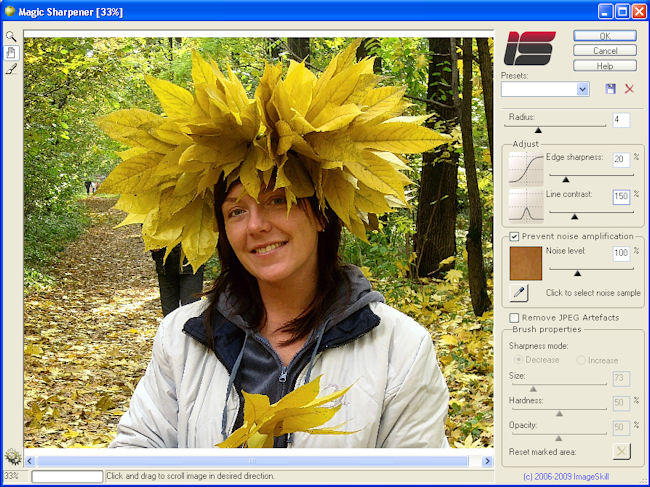
 Zoom tool Zoom tool
|
Use this tool for zooming. Click on an image to zoom in and right click on an image to zoom out.
|
 Pan tool Pan tool
|
Click and drag to pan the image if it is larger than the window.
|
 Brush for local sharpness correction Brush for local sharpness correction
|
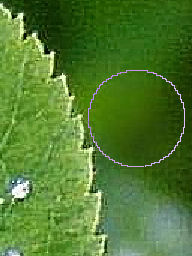
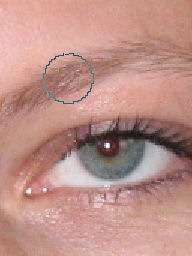
Use the brush to adjust sharpness locally. Click the brush icon in the toolbar, choose the option Decrease or Increase from the Sharpness mode and set the brush properties - see below. Move the brush stroke to the place where you want to decrease or increase the sharpness locally and click the left mouse button. Assuming you start with an image which you have just sharpened using the plug-in, you can use the brush to locally reduce the sharpness but by no more than the plug-in sharpened it – see left image below. That means you are back to the original, untouched image. In contrast to this, the brush may be used to increase the sharpness but by no more than is possible with the plug-in – see right image below.
 |
 |
Local sharpness decreasing behind the leaf |
Local sharpness increasing of the eyebrow |
|
|
To reverse the effect of local sharpness correction you need to click the right mouse button.
|
Radius
|
Allows changing the size of image fuzziness in pixels
|
Edge sharpness
|
Increases edge steepness
|
Line contrast
|
Allows increasing the amplitude and steepness of fine details in an image.
|
Prevent noise amplification
|
Check this flag to prevent noise increasing in selected noisy image sample.
|
Noise level
|
Decreases the extent of noise amplification
|
Remove JPEG Artefacts
|
Removes JPEG artefacts
|
Brush properties
|
Sharpness mode - Select the Decrease (Increase) radio button to make an appropriate local sharpness correction
Size - Sets the diameter of the brush in pixels
Hardness – Sets the brush edge sharpness
Opacity – Sets the transparency level for the brush
Reset marked area – Click this button to cancel the result of the local sharpness correction for a chosen Sharpness mode.
|
|
Using Magic Sharpener
|
|
|
This plug-in can process RGB or Grayscale image with 8 or 16 bits/channel only with or without transparency. If you have an image in another mode (CMYK, LAB etc.) – Magic Sharpener will be disabled in “Effect” menu.
- Run your graphic host and open an image.
- Run the Magic Sharpener plug-in. (For example, in the Adobe Photoshop click "Filter->Image Skill->Magic Sharpener ").
- Adjust plug-in parameters to achieve a desirable result.
- Press OK button and return to host.
|
FAQ and Troubleshooting
|
|
I can't find Magic Sharpener in my graphic host’s Effects/Filter menu.
Check that the plug-in is in the graphic host’s Plug-ins folder, or, if necessary, set the path to the plug-in using the graphic host‘s “Preferences” option. To do this in the Jasc (Corel) PSP click File -> Preferences -> File Locations -> Plug-ins and add the path to the plug-in. (In the Adobe Photoshop click Edit -> Preferences -> Plug-ins and add the path to the plug-in). Re-run your graphic host.
I can't run Magic Sharpener or Magic Sharpener is greyed out in graphic host’s Effects/Filter menu.
Graphic hosts disable the plug-in if the current image is not suitable for use with Magic Sharpener. The image must be in RGB or Grayscale format with 8 or 16 bit/channel. If image has CMYK, LAB or something other format, you will have to convert it to RGB or Grayscale.
|
Quick Buy
|
|
|
You can order the full version of this plug-in now ($29.95). At the moment, any upgrades to our products are given to registered customers free of charge.
Order this product via


|
|


